Hardware:Mac Mini M1 2020: verschil tussen versies
Geen bewerkingssamenvatting |
Geen bewerkingssamenvatting |
||
| Regel 20: | Regel 20: | ||
:Click the "Add Shortcut" button next to it and press your desired key combination (e.g., Control + Command + S).<ref name="toets">Informatie afkomstig van [https://www.google.com/search?q=mac+create+a+shortcode+for+Start+Screen+saver&sca_esv=03ab7cea052dd2bb&ei=Nu9saYWUJrSH9u8PnLWviAw&ved=0ahUKEwiFh-2op5WSAxW0g_0HHZzaC8EQ4dUDCBE&uact=5&oq=mac+create+a+shortcode+for+Start+Screen+saver&gs_lp=Egxnd3Mtd2l6LXNlcnAiLW1hYyBjcmVhdGUgYSBzaG9ydGNvZGUgZm9yIFN0YXJ0IFNjcmVlbiBzYXZlcjIFEAAY7wUyBRAAGO8FMggQABiABBiiBDIIEAAYgAQYogRI6Z8BUI8MWM-aAXABeAGQAQCYAXagAcwOqgEEMjQuMbgBA8gBAPgBAZgCGaAClg_CAgoQABhHGNYEGLADwgIKECEYChigARjDBMICBBAhGArCAggQIRigARjDBJgDAIgGAZAGCJIHBDI0LjGgB5FisgcEMjMuMbgHkA_CBwYwLjIwLjXIBzyACAE&sclient=gws-wiz-serp Google AI]</ref> | :Click the "Add Shortcut" button next to it and press your desired key combination (e.g., Control + Command + S).<ref name="toets">Informatie afkomstig van [https://www.google.com/search?q=mac+create+a+shortcode+for+Start+Screen+saver&sca_esv=03ab7cea052dd2bb&ei=Nu9saYWUJrSH9u8PnLWviAw&ved=0ahUKEwiFh-2op5WSAxW0g_0HHZzaC8EQ4dUDCBE&uact=5&oq=mac+create+a+shortcode+for+Start+Screen+saver&gs_lp=Egxnd3Mtd2l6LXNlcnAiLW1hYyBjcmVhdGUgYSBzaG9ydGNvZGUgZm9yIFN0YXJ0IFNjcmVlbiBzYXZlcjIFEAAY7wUyBRAAGO8FMggQABiABBiiBDIIEAAYgAQYogRI6Z8BUI8MWM-aAXABeAGQAQCYAXagAcwOqgEEMjQuMbgBA8gBAPgBAZgCGaAClg_CAgoQABhHGNYEGLADwgIKECEYChigARjDBMICBBAhGArCAggQIRigARjDBJgDAIgGAZAGCJIHBDI0LjGgB5FisgcEMjMuMbgHkA_CBwYwLjIwLjXIBzyACAE&sclient=gws-wiz-serp Google AI]</ref> | ||
:Creeëren zwarte screen saver<ref name="saver">Informatie afkomstig van {{#tag:easyview|VsTv86f2a2g|type=youtube|thumbnail=macOS 26 Tahoe: How to Change Screensaver With Your Own Photos on MacBook!}}</ref> | :Creeëren zwarte screen saver<ref name="saver">Informatie afkomstig van {{#tag:easyview|VsTv86f2a2g|type=youtube|thumbnail=macOS 26 Tahoe: How to Change Screensaver With Your Own Photos on MacBook!}}</ref> | ||
::1 Maak een zwarte.jpg in het juiste scherm formaat | ::1 Maak een afbeelding genaamd zwarte.jpg in het juiste scherm formaat | ||
::2 Neem deze op in <em>/Library/Screen Savers</em> | ::2 Neem deze op in <em>/Library/Screen Savers</em> | ||
::3 Ga naar Settings->Wallpaper | ::3 Ga naar Settings->Wallpaper | ||
Huidige versie van 19 jan 2026 14:40
 +
+  (command+tab) kan nu Luna display worden verlaten
  +
+ 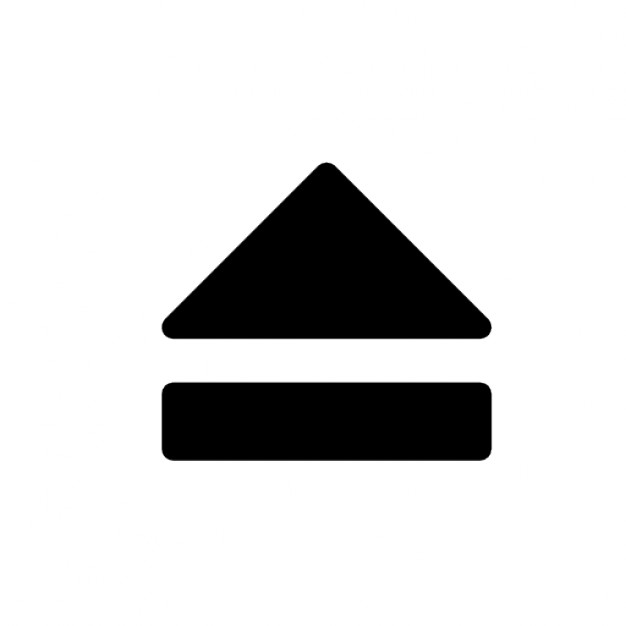 (
(- ↑ Informatie afkomstig van Google AI
- ↑ Informatie afkomstig van macOS 26 Tahoe: How to Change Screensaver With Your Own Photos on MacBook!
- ↑ Informatie afkomstig van Apple
- ↑ Informatie afkomstig van
 2022 - M1 Mac Mini Running Apple Displays
- ↑ Informatie afkomstig van Astropad